Product-led content strategy creates content that helps users solve real problems using your product, not just get generic advice. It is needed to turn traffic into sign-ups, demos, and pipeline. It is created by finding high-intent topics, showing practical workflows, adding proof, using clear CTAs, and measuring revenue impact.
Introduction
Creating content for products isn’t just about showcasing features—it’s about helping users take action. Most blogs stop at awareness, missing the chance to drive real outcomes. Product-led blog content connects product value with real use cases.
In this blog, we’ll break down how to create blog content that drives action, not just awareness.
[text_lm]
What Product-Led Content Really Means
Product-led content means showing people how a product can help do something.
Instead of just explaining things, it guides readers how to use the product— step by step. The product is part of the solution, not something added at the end.
It’s less about explaining and more about practically showing how the product can get things done.
What that looks like:
- You show how to solve a problem using your product
- You focus on clear outcomes (faster, easier, automated)
- You guide users step by step, not just give ideas
[image_lm]
How to Find High-Intent, Product-Led Topics
1. Use Internal Data
- Customer conversations: Focus on topics about pain-points, product benefits, and unique features understood from conversations from customers.
- Product data: Focus on features tied to real, ongoing use of the product.
- Feedback & testimonials: Turn specific results (time saved, efficiency gained) into topics
2. Use Search & Review Signals
- Search queries: Look at “People Also Ask” and “Related Searches” about your product or similar competitor products.
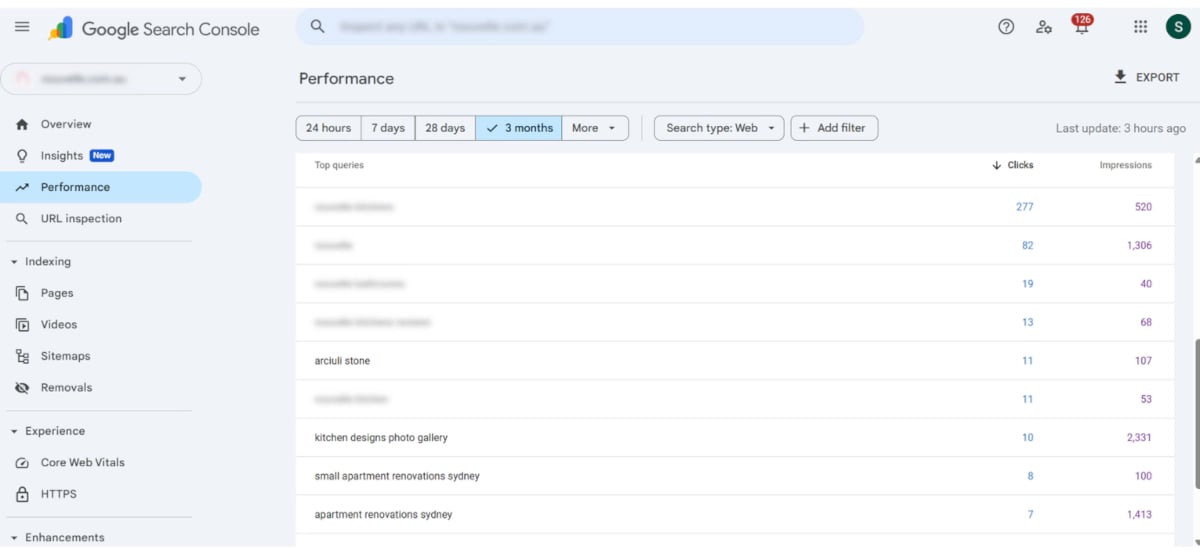
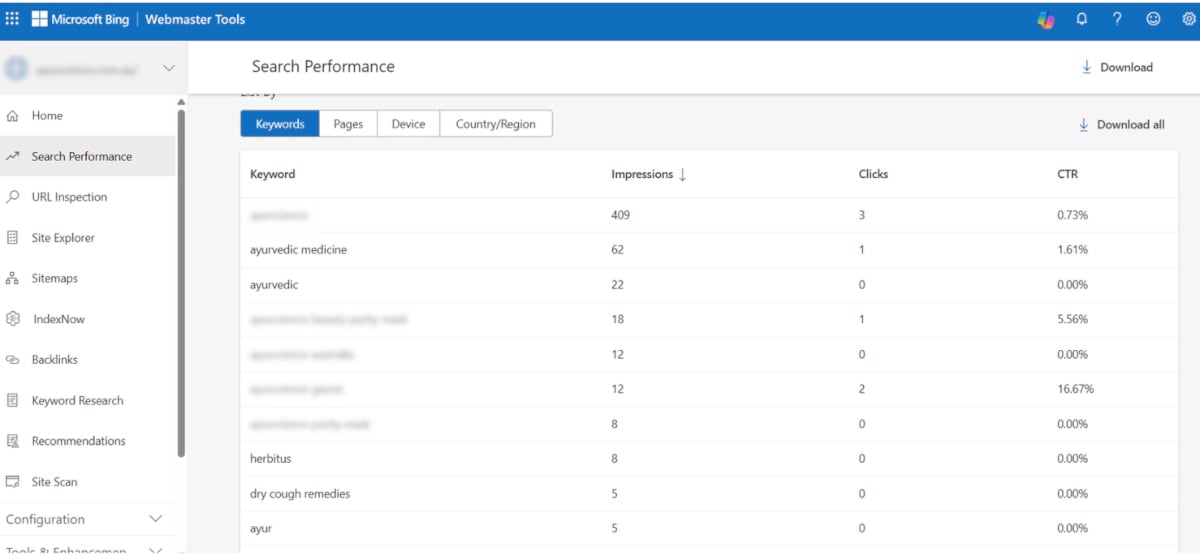
- Platforms: Use Google Search Console and Bing Webmaster Tools for this.
- Review sites: Check review sites relevant to your niche for your product and similar products.
3. Search for Customer-centric information on other platforms.
- Check if there are real queries related to your product/similar competitor products on platforms like Facebook, YouTube, Reddit and Quora. You can search your product name/ name of similar competitor products/the painpoint you’re trying to solve on these platforms.
- Look for real frustrations and manual processes your product can simplify.
[text_lm]
4. Prioritise High-Intent Topics
- Comparison: Users evaluating tools
Create content that evaluates and compares different tools to help users decide which option best fits their needs. Focus on clear differences, real use cases, and practical insights that support decision-making.
- Efficiency: Users trying to save time or automate
Create content that shows how users can complete tasks faster or automate manual processes. Highlight simpler workflows and demonstrate how effort and time can be reduced.
- Outcome: Users focused on a specific result
Create content that helps users achieve a specific result with clear, step-by-step guidance. Focus on delivering the outcome quickly without unnecessary complexity.
[text_lm]
How to Actually Integrate Your Product into Content
1. Make it clear and practical
Make your content clear and practical by showing users exactly what to do, not just telling them. Use annotated screenshots to guide them about the exact steps, walk them through process involved, and focus on how the task actually gets completed.
2. Use the “better way” angle
Start by briefly showing the manual or more time-consuming approach, then introduce how your product simplifies or speeds things up. This helps users clearly see the difference.
3. Strengthen with social proof
Add short testimonial snippets after key steps, include quick quotes from relevant review sites, and show how real users have achieved similar outcomes using your product.
4. Use clear, action-based CTAs
Use clear, action-based CTAs that feel like a natural next step. Instead of broad phrases, guide users to specific actions like trying a process, setting something up, or exploring a feature they’ve just seen.
Place these prompts right after key moments in the content so it’s easy for users to take action while the value is still fresh.
Some examples of CTAs are:
- Use template
- View demo
- Start free trial
[image_lm]
Content Types That Drive Conversions
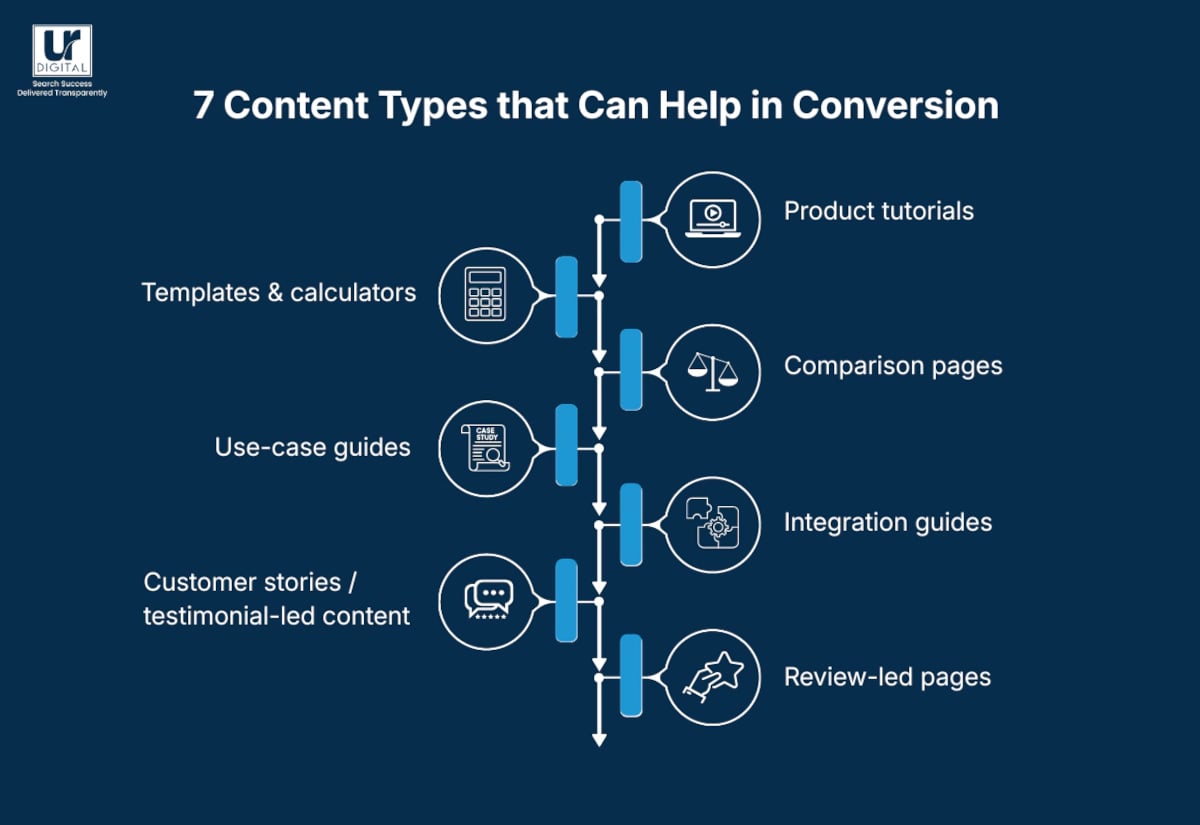
Not every piece of content needs to sell. But when users are already comparing options, looking for solutions, or trying to complete a specific task, the right content format can help turn interest into action.
Product-led content works best when it shows the product in context. Instead of simply explaining what your product does, these content types help readers understand how it solves a real problem and what they can do next.
1. Product Tutorials
Product tutorials show users exactly how to complete a task using your product. These work well for high-intent users who are already looking for a solution and want to understand how the product fits into their workflow.
For example, instead of writing a general article about “how to automate reports,” a product tutorial could show how to build an automated report inside your platform step by step.
2. Templates and Calculators
Templates, calculators, checklists, and other practical tools give users something they can use immediately. They reduce friction because the user gets value before they even speak to your sales team or start a trial.
These assets are especially useful when they connect directly to a product feature, workflow, or use case.
3. Comparison Pages
Comparison pages help users evaluate options when they are close to making a decision. These pages can compare your product with competitors, alternatives, or manual processes.
Strong comparison content should be honest, clear, and focused on real use cases rather than generic feature lists. The goal is to help readers understand which option is the best fit for their needs.
4. Use-Case Guides
Use-case guides show how your product helps a specific audience solve a specific problem. These can be built around industries, roles, teams, or common workflows.
For example, a use-case guide might explain how marketing teams, finance teams, or operations teams can use the same product in different ways.
5. Integration Guides
Integration guides explain how your product works with other tools your audience already uses. These are powerful because they show how your product fits into an existing workflow instead of asking users to completely change how they work.
They are especially useful for SaaS, apps, platforms, and tools that rely on connected systems.
6. Customer Stories and Testimonial-Led Content
Customer stories show real outcomes. They help readers see how other businesses solved a similar problem, what changed, and what results were achieved.
To make this content stronger, include clear before-and-after context, specific results, and direct quotes where possible. This helps build trust and makes the product outcome easier to believe.
7. Review-Led Pages
Review-led pages use customer feedback from review platforms, testimonials, and support conversations to answer common questions and objections.
This type of content works well because it reflects what real users care about. It can help address concerns around pricing, ease of use, support, implementation, or product limitations before the user reaches out.
Together, these content types help bridge the gap between education and conversion. They give users practical value while naturally showing how your product helps them move from problem to solution.
[text_lm]
How to Optimise Existing Content for Pipeline
1. Pick the right pages
- Fix low-conversion pages: Target high-traffic posts that aren’t getting sign-ups.
- Focus on relevant topics: Audit posts that solve problems your product handles.
- Target “Page 1” rankings: Update posts sitting at the bottom of the first page of search results.
2. Show the product
- Insert “How-to” steps: Add a clear section on how to solve the problem using your tool.
- Use real screenshots: Replace stock photos with images of your software.
- Show the manual vs. product way: Compare the slow manual process to the fast product version.
[image_lm]
3. Add proof
- Use specific data: Mention exact results, for e.g., “saved 5 hours a week.”
- Place quotes near features: Put a customer testimonial next to the feature it describes.
- Include third-party reviews: Add snippets from review sites relevant to your brand or niche.
4. Direct the user
- Use task-based CTAs: Swap “Sign up” for “Try this template” or “Start this workflow.”
- Place buttons in-line: Put CTAs immediately after you show a solution.
- Link to features: Send users to the specific tool mentioned, not the homepage.
5. Keep it current
- Update UI images: Make sure screenshots match your current software version.
- Check internal links: Ensure every link leads to a working, relevant page.
- Ensure naming consistency: Use the same feature names in your blog and your app.
[text_lm]
Common Mistakes to Avoid
- Waiting too long to show the solution
Mention it early as the practical tool for solving the problem so the reader understands its value immediately.
- Targeting broad, low-intent keywords
Focus on specific “how-to” queries where your product is a logical part of the answer.
- Using “corporate” or flowery prose
Busy professionals want answers, not wordy introductions or jargon. Strip away the fluff and get straight to the point to respect the reader’s time and build trust.
- Failing to include visual proof
Use clear screenshots or short loops of your product in action to show exactly how the work gets done.
- Using generic, disconnected links
Link directly to the specific feature, template, or tool you just mentioned so the reader can start using it immediately.
- Ignoring how AI and “Answer Engines” read
If your content lacks clear headings and direct, factual answers, AI snapshots won’t be able to find or recommend you. Use a logical hierarchy and concise summaries so generative tools can easily cite your product as the solution.
- Trying to appeal to everyone
Messaging that tries to please every reader ends up helping no one. Clearly define who your product is for—and who it isn’t—to attract high-quality leads that actually stick around.
- Forcing the product where it doesn’t fit
Only mention your tool when it genuinely helps the reader complete the specific task they are reading about.
- Giving high-level advice with no clear steps
Provide specific, actionable steps so the user knows exactly how to move from the problem to the solution using your product.
- Ignoring what actual users are saying
Use real user feedback to address the actual questions and roadblocks your customers face every day.
- Presenting only “perfect” use cases
Hiding limitations or realistic challenges makes your content feel like an ad rather than a resource. Sharing honest, balanced perspectives builds the credibility needed to turn a skeptical reader into a confident lead.
[image_lm]
How to Measure Content’s Impact on Revenue
- Seeing which posts lead to a signup
Look at the articles someone clicked through before they finally joined to see which topics are doing the heavy lifting.
- Watching “Direct-to-Product” clicks
Track how many people actually use the specific templates or tools you link to within your posts to see if you’re driving real action.
- Linking your guides to the actual pipeline
Keep tabs on the people who find you through your content so you can see the total dollar value of the deals your writing helped start.
- Tracking revenue back to specific pages
Find out exactly how much money each “how-to” guide brings in using tools like GA4, HubSpot, or HockeyStack to see which topics actually pay off.
- Testing the power of social proof
Compare the signup rates on pages with and without customer reviews to see if hearing from real people what is finally builds that trust.
[text_lm]
Conclusion
Product-led content isn’t about pushing your product—it’s about making it genuinely useful in the moments that matter. When your content helps people do something, not just learn about it, it naturally drives action and builds pipeline.
The real opportunity is in what you already have. With a few practical changes—clearer steps, real workflows, and stronger product integration—your content can start working much harder for you.
If you want to make that shift, UR Digital can help you turn your content into something that not only attracts attention, but consistently drives meaningful results. Contact us to learn more about our services and pricing.
FAQs
How do I decide which feature to highlight in a piece of content?
Pick the feature that directly helps complete the task the reader came for—don’t try to showcase everything at once.
What should I do if my product only solves part of the problem?
Be honest about it—show where your product fits best and keep the rest practical, so the content still feels helpful.
How can I make product steps feel less overwhelming for first-time users?
Focus on one small win—like completing a single task—rather than explaining the full product in one go.
How do you avoid sounding too salesy in product-led blogs?
Focus on showing how something works rather than telling users to buy. If the content is genuinely useful, the product sells itself.
Should every blog post be product-led?
No—top-of-funnel content still has a role. But your high-intent and mid-funnel content should clearly connect to your product.
How do you choose which product features to highlight in content?
Prioritise features that directly help users achieve a specific outcome, especially ones tied to conversions or long-term usage.
How do you know if a topic is too broad for product-led content?
If you can’t show a clear step-by-step solution using your product, the topic is likely too broad.
My product has multiple use cases—how do I avoid confusing the reader in one blog?
Focus each blog on one clear outcome (e.g. “automate reporting”), not the entire product or multiple workflows.