Core Web Vitals measure how fast, responsive, and stable your website feels to users. Poor performance leads to higher bounce rates and lower rankings. By improving loading speed (LCP), interactivity (INP), and layout stability (CLS), you can enhance user experience, increase conversions, and strengthen overall SEO performance.
Introduction
Core Web Vitals might sound technical, but they’re really about one thing: giving users a smoother, more enjoyable experience. Google uses these metrics to understand how your pages behave in the real world, from loading performance to layout stability. When your site struggles in these areas, users get frustrated – and your rankings can suffer. User experience is a very important ranking factor for all major search engines.
This article will help you understand what Core Web Vitals are and why they matter.
[text_lm]
What Are Core Web Vitals?
Core Web Vitals are a set of performance metrics created by Google to measure how fast and stable a webpage feels for real users.
These metrics are all about user experience — how smooth and fast your site feels the moment someone lands on it.
Important Core Web Vitals
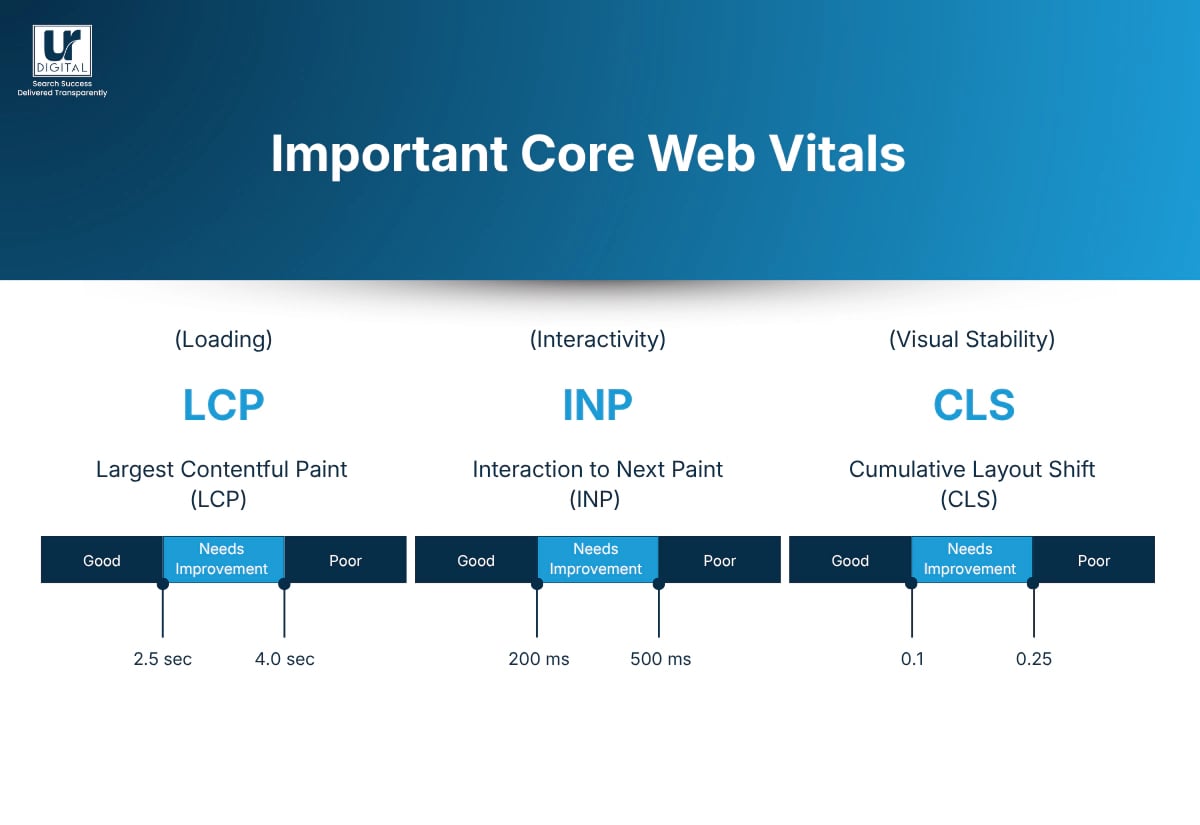
1. Largest Contentful Paint (LCP)
This measures how long it takes for the main part of a page — usually a big image or headline — to appear.
2. Interaction to Next Paint (INP)
INP measures how quickly your website reacts when a user clicks, taps, or interacts with something. Slow or laggy interactions create a sense of “stickiness” that turns people off.
3. Cumulative Layout Shift (CLS)
This measures how much the page layout moves around as it loads. Think of buttons jumping, text shifting, or ads pushing content down. It’s annoying, and Google knows it — so CLS rewards stable, predictable layouts.
Together, these three metrics help Google understand whether your website delivers a smooth, reliable experience. The better your scores, the easier it is for visitors to browse, buy, read, or take action — and the stronger your site can perform in search.
[text_lm]
Why Core Web Vitals Matter
1. Google uses them as ranking signals
When your site performs well across LCP, INP, and CLS, Google sees it as a better experience and is more likely to rank it higher.
2. They influence key business outcomes
Good Core Web Vitals lead to:
- Lower bounce rates
- Longer time on site
- More conversions (sales, enquiries, sign-ups)
3. Stronger customer trust
They’re part of your “first impression.” A page that loads fast and feels stable instantly builds confidence. A page that jumps around or takes too long to respond does the opposite.
4. They give a competitive edge
Many websites ignore performance until it becomes a problem. Getting your Core Web Vitals right gives you an immediate advantage.
[image_lm]
How to Improve Core Web Vitals Performance
1. Compress and resize images
Use tools or plugins to reduce image file sizes, convert to WebP, and ensure images aren’t larger than they need to be. If you are like me and do not prefer online tools, I suggest you use cwebp from Google, it is a very small lightweight utility. All the steps are listed in our blog How to compress and convert images to WebP using WebP Converter by Google on Windows. This is also super easy to fix.
2. Improve server response time (TTFB)
Upgrade to faster hosting, enable server-level caching, and use a CDN to reduce latency for users across different regions.
3. Preload key assets
Preload hero images, critical fonts, or above-the-fold content to speed up LCP and get your main content visible sooner.
4. Minimise and defer JavaScript
Remove unused scripts, defer non-critical JS, and break large bundles into smaller chunks to improve interactivity and INP.
5. Optimise third-party scripts
Audit tracking tools, chat widgets, and external embeds to reduce unnecessary load — these often slow down interaction.
6. Set explicit width and height for images and embeds
Defining dimensions prevents unexpected layout movement, significantly improving CLS.
7. Reserve space for ads and dynamic content
Allocate fixed containers for ads, pop-ups, or injected modules so they don’t push content around while loading.
8. Use lazy loading for below-the-fold elements
Delay loading images and resources not immediately visible to speed up initial rendering.
9. Implement efficient caching
Use browser caching, page caching, and CDN caching to deliver content faster and reduce load on the server.
10. Optimise your CSS
Inline critical CSS and load non-essential CSS asynchronously to reduce blocking resources that delay LCP.
11. Reduce DOM size and complexity
Clean up unnecessary elements and scripts, as large DOM trees slow down rendering and hurt INP.
12. Audit your plugins regularly
Remove outdated or heavy plugins — especially on CMS platforms like WordPress — to avoid performance bottlenecks.
13. Use modern image formats and CDNs
Deliver WebP/AVIF images via a CDN to ensure fast global delivery and less bandwidth.
14. Monitor performance with real-user data
Track field data in Google Search Console and CrUX to see how real visitors experience your site over time. If you do not see anything here, you can also use PageSpeed Insights or Lighthouse on Chromium. I personally prefer WebPageTest.org over PageSpeed Insights or Lighthouse, because it allows me to change the server location and test with various connection speeds and the Waterfall feature allows me to see render blocking resources.
[text_lm]
Solutions for common platforms
WordPress
A lot of WordPress websites are affected by poor Core Web Vitals and they generally come from theme bloat. Use a plugin like Litespeed Cache which is something I have been using for many years and it just works. If you are unsure what to setup, I suggest you watch this amazing LiteSpeed Cache WordPress Settings YouTube by Jack Cao.
Pro tip from my experience: Do not make many changes and save. Save every time you make a change and then test. If you make many changes, it will be hard to know which change caused an issue. Something I have learnt from my experience.
Note: Check with your hosting company beforehand as not all hosts are compatible with Litespeed Cache. If you are using SiteGround, or managed hosting companies like Kinsta or Pressidium, they have their inbuilt list of supported tools. I personally use VentraIP for a lot of my sites and they do support it.
Shopify
Shopify stores generally do not have issues with Core Web Vitals but if you are facing issues, best is to use a plugin like Rocket Page Speed Optimiser. I personally do not like to use 3rd party apps on Shopify unless absolutely necessary due to recurring costs. I am a tech nerd so I Vibe-Code my solutions in, with easy access to Codex or Gemini or Claude, there is no reason why you cannot.
How to Test Core Web Vitals
1. WebPageTest
WebPageTest lets you test your site from specific locations, devices, and connection speeds.
It provides:
- Detailed waterfall breakdowns.
- Core Web Vitals results.
- Filmstrips showing how your page loads over time.
- Deep insights into what’s slowing your page down.
It’s especially helpful when you want a more fine-grained or developer-level look at performance.
2. Google PageSpeed Insights
This is the easiest place to start. Simply enter your URL, and it will show:
- Lab data (simulated tests run by Google)
- Field data (real user performance data, if available).
- Scores for LCP, INP, and CLS.
- Specific recommendations on what to fix.
3. Google Search Console
If you want a broader view of your site’s performance, Search Console is the best tool. Using this tool, you can access the Core Web Vitals report. This report groups your URLs and shows:
- Which pages are “Good,” “Needs Improvement,” or “Poor”.
- Issues affecting multiple pages.
- Progress over time, based on real-world usage.
- This is especially useful for spotting site-wide problems rather than single-page issues.
- Please note: If you see “No data available” it is because either your property is new or there is not enough data in the CrUX report.
[image_lm]
Conclusion
Now that you understand Core Web Vitals, the next step is to review how your site performs across loading speed, responsiveness, and layout stability. Start by running tests, then list the issues that appear most often. From there, prioritise fixes that offer the largest impact, like image optimisation and reducing heavy scripts.
If you need expert support, UR Digital can help you audit your Core Web Vitals, identify key bottlenecks, and implement improvements that lift both user experience and search visibility. Contact us today to boost your site’s performance.
[text_lm]
FAQs
What causes poor Core Web Vital scores?
Poor scores usually come from slow servers, large images or scripts, layout shifts caused by ads or dynamic content, and inefficient code. Anything that delays rendering or causes elements to move unexpectedly can drag your metrics down.
Do Core Web Vitals still matter?
Yes — Core Web Vitals remain part of Google’s page experience signals. While they aren’t a direct ranking booster on their own, they strongly influence user behaviour, engagement, and how competitive your site is in search.
What is a good Core Web Vitals score?
A good score means your site is in the “Good” threshold for all three metrics: LCP under 2.5 seconds, CLS under 0.1, and INP under 200 milliseconds. Hitting these benchmarks indicates your site loads quickly, feels responsive, and stays visually stable.
How to optimise Core Web Vitals?
Start by compressing and properly sizing images, reducing JavaScript bloat, and improving server response times. You can also stabilise layouts with proper width/height attributes, use a CDN, and lazy-load non-critical elements to speed up rendering.
Why are Core Web Vitals important in SEO?
They directly affect how users experience your site, influencing engagement, bounce rates, and conversions — all signals that support stronger SEO performance. Google prioritises pages that load fast, respond quickly, and remain visually stable.
Are Core Web Vitals the same for mobile and desktop?
No — Google assesses mobile and desktop separately, and mobile usually performs worse due to slower connections and devices. It’s important to optimise for both, with extra attention to mobile performance.
How long does it take to see improvements after fixing Core Web Vitals?
Most improvements appear within 28 days as Google refreshes real-user (CrUX) data. However, if your traffic is low, it may take longer for enough field data to accumulate.
Do plugins affect Core Web Vitals?
Yes — heavy or poorly coded plugins can slow rendering, trigger layout shifts, and increase JavaScript execution time. Regular plugin audits help keep your site fast and stable.
Do Core Web Vitals impact all pages or just key pages?
Core Web Vitals are assessed on a page-by-page basis, but Google also considers sitewide patterns. If many pages perform poorly, it can influence your overall performance and user experience across the site.
How do ads affect Core Web Vitals?
Ads can cause large layout shifts (hurting CLS) or slow loading (impacting LCP and INP). Using reserved space for ads and loading them responsibly can minimise disruption.
Disclaimer
The contents of this blog are for informational and educational purposes only. They do not constitute professional SEO, GEO, AEO, ASO, or digital PR advice and should not be relied upon as such. We recommend consulting with an SEO expert before implementing any strategies. UR Digital accepts no responsibility or liability for any outcomes resulting from actions taken in reliance on the information contained in this content. Links to third-party websites are provided for reference purposes only. We do not endorse or guarantee the accuracy, relevance, or completeness of their content.