Stock photos don’t directly harm SEO, but they rarely help either. Overused, generic visuals reduce engagement, trust, and image search potential. To minimise impact, customise images, optimise filenames and alt text, compress files, and balance stock with authentic visuals to improve performance, credibility, and overall search visibility.
[text_lm]
Introduction
Many websites rely on stock photos to make their pages look complete and professional. They’re convenient, cost-effective, and widely available. Still, they raise valid SEO questions: do they limit image search potential or affect rankings?
This guide explores how stock photos really affect SEO and how you can use visuals without compromising SEO.
Also, if you’re thinking about using AI to create images for your site or brand, check out our blog Are AI-Generated Images Good or Bad for SEO? Get a deep-dive overview, understand the risks, and learn how to use AI visuals without harming rankings or user trust.
Are Stock Photos Bad for Your SEO?
Short answer: not always.
Stock photos only hurt your SEO if they look generic or appear on many other sites. Original or well-edited images always perform better because they feel authentic and keep people engaged. Hence, there’s often a risk involved while using stock images.
How Google Treats Stock Images
When Google crawls your site, it recognises reused images across the web and attributes originality to the first source. This is usually the stock site—so your page gains no image ranking benefit.
Also, generic filenames and alt text also give weak relevance signals, making it harder for Google to connect visuals to your content. Because users engage less with inauthentic imagery, engagement metrics like dwell time can drop, indirectly affecting rankings.
Plus, large unoptimised stock files can slow load speeds, hurting Core Web Vitals. In short, stock photos don’t harm SEO outright—but they rarely help your site stand out or perform better in search.
[image_lm]
Disadvantages of Using Stock Photos
- Lack of originality: Stock images are often reused across many websites, making your content look generic.
- Reduced trust: Audiences can sense when visuals aren’t genuine, which can weaken brand credibility.
- Lower engagement: Generic visuals are less likely to grab attention or encourage interaction.
- Brand inconsistency: Stock photos may not match your tone, style, or colour palette.
- Licensing risks: Misusing or failing to attribute images correctly can lead to copyright issues.
When Can Stock Photos Be Used
Stock photos can be used in worst case scenarios when there are time and budget constraints. They are great for illustrating general ideas like teamwork or growth that don’t need brand-specific shots.
If you’re using them, here are some useful pointers:
- Edit or crop them to match your brand’s look and tone.
- Use them mainly for blog banners or social posts alongside strong copy.
- Choose images from smaller, paid libraries to avoid overused visuals, and balance them with real team or product photos for authenticity.
[text_lm]
Best Practices If You’re Using Stock Photos
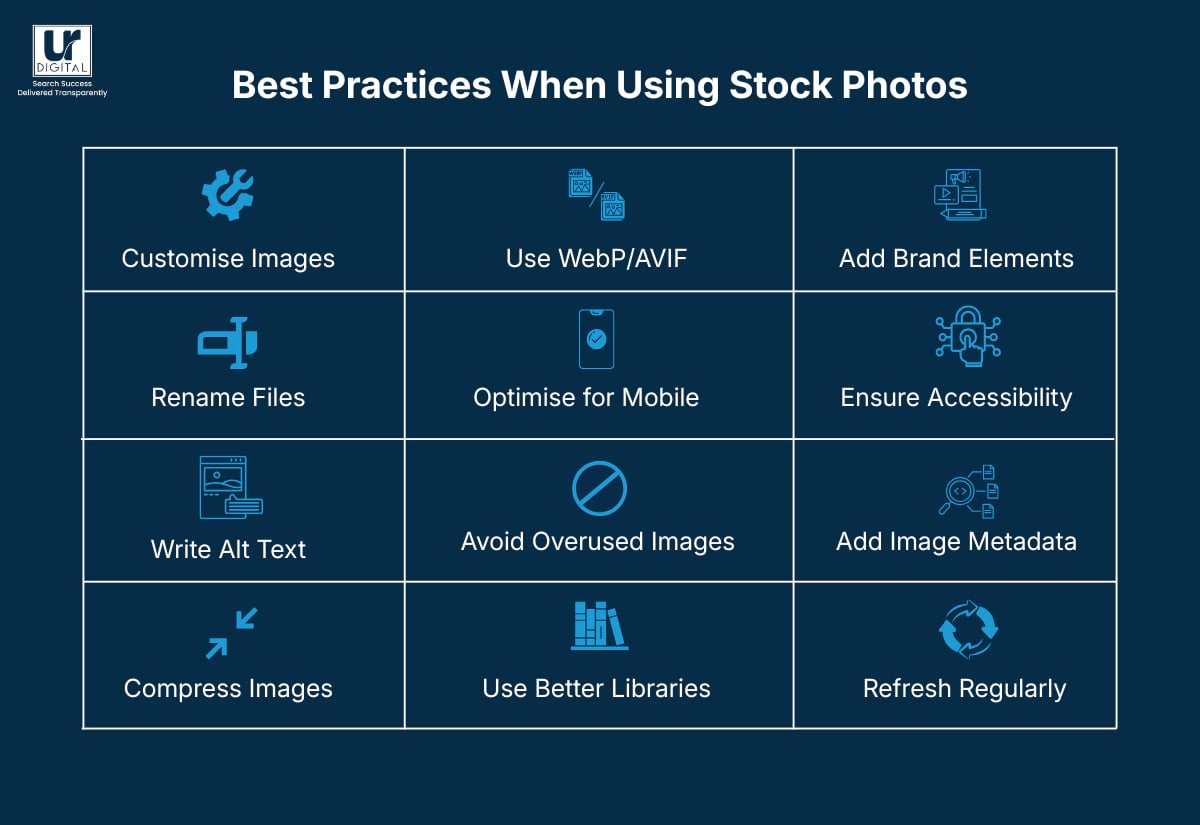
1. Customise before publishing
You can crop, colour-grade, or apply your brand’s tone or filter to make the photo look consistent with your other visuals. Even small tweaks (e.g., contrast, blur, aspect ratio) can make it stand out from the original stock version.
2. Rename your files properly
Change filenames like IMG_3021.jpg to descriptive ones such as “modern kitchen renovation ideas”. It helps with SEO and accessibility.
3. Write unique alt text and captions
Avoid copying the stock site’s default tags. Describe what’s actually happening in the image and how it relates to your content.
4. Compress without losing quality
Use tools like TinyPNG, Squoosh, or ShortPixel to reduce file size. Google’s PageSpeed Insights hates oversized images.
5. Convert to modern formats
Save or serve your images in WebP or AVIF instead of JPG/PNG for faster loading and better compression. Read Image Optimisation: How to compress and convert images to WebP using WebP Converter by Google on Windows.
6. Optimise for mobile first
Ensure images resize correctly and maintain clarity on smaller screens. This can help improve speed and performance.
7. Avoid overused visuals
Use reverse image search (e.g., TinEye or Google Images) to check how often a photo appears online before you use it.
8. Use paid or niche libraries
Platforms like Stocksy, Death to Stock, Unsplash+, or Noun Project offer more authentic, less saturated collections.
9. Add branded overlays or elements
Include your logo, headline, or a semi-transparent tint to make the image feel part of your brand identity.
10. Maintain accessibility standards
Keep contrast ratios readable if adding text overlays, and ensure alt text describes the purpose, not just the image content.
11. Embed metadata
Add keywords, copyright details, and location tags in EXIF or IPTC data where possible: it can improve your image’s visibility in Google Images.
12. Refresh images periodically
Rotate visuals on evergreen pages every year or so to avoid stale content and boost freshness signals.
[text_lm]
Statistics on Stock Photos You Can’t Ignore
- As per Growbo, websites using authentic team photos see a 65% higher trust score compared to those using stock photography.
- According to Techbeloved, another website: “High-quality images, especially authentic photos of your team, workplace or products, significantly outperform generic stock photography in building trust.” Techbeloved
- As per NeedSEO: “A study found that using stock photos can actually reduce conversion rates by up to 50%.” NeedSEO
- A study by Arvix that analysed peer-to-peer marketplaces found that “high quality user-generated images … outperform stock imagery in eliciting perceptions of trust from users.”
Alternatives to Using Stock Photos
1. Create your own images
Shoot real moments—your team, space, and products. Even phone photos can look great with good lighting and composition.
2. Book a quick photo session
A short shoot with an experienced local photographer gives you a custom image library that fits your brand perfectly.
3. Use customer content
Ask customers to share photos of your products in use. With permission, this adds authenticity and social proof.
4. Try free image libraries
Ask customers to share photos of your products in use. With permission, this adds authenticity and social proof.
5. Go beyond photos
Use illustrations, icons, or infographics if they suit your style better.
Want to understand how to optimise images once you choose them? Download our FREE Practical Image SEO Guide.
[text_lm]
Conclusion
Understanding the role of stock photos is the first step—taking action is the next. Review your site for repetitive imagery, ensure all images are compressed and tagged correctly, and plan a long-term mix of original and curated visuals. These changes help you stand out in both search results and user experience.
UR Digital can help you optimise your images for SEO and improve your website’s overall visibility. Book an SEO consultation with us and take the next step toward better visibility.
FAQs
Does using the same stock photo URL as other sites affect SEO?
Yes, indirectly. When many domains embed the same image from the stock site’s CDN (e.g., images.unsplash.com), Google attributes the image ownership and canonical source to that CDN, not to your site. Always download, rename, and host the image locally on your domain to retain SEO value.
Should stock photos be included in XML sitemaps?
Yes. If hosted locally, add them via an image sitemap extension to help Google index them under your domain. This won’t help much if the images are hosted externally (e.g., on Shutterstock’s or Unsplash’s servers).
Can EXIF or IPTC metadata in stock photos affect SEO?
They can provide minor benefits. Retaining or customising EXIF metadata (like author, copyright, or geolocation) can reinforce relevance signals, though Google has said it’s a lightweight factor. Stripping metadata entirely is fine for speed but loses those semantic hints.
How should I name stock photo files for SEO?
Always rename files before upload. Instead of pexels-photo-12345.jpg, use descriptive, keyword-rich names like team-meeting-marketing-agency-sydney.jpg. This improves topical relevance and helps images appear in search results.
What’s the best way to optimise stock photos for page speed?
Convert large JPEGs to WebP or AVIF, compress them using tools like TinyPNG or Squoosh, and enable lazy loading (loading=”lazy”). Use responsive image attributes (srcset and sizes) to serve the right image per device.
Does schema markup help stock photos rank better?
Not directly, but ImageObject schema can improve how visuals appear in SERP rich results. Include properties like contentUrl, creator, and license—especially if you’ve customised or edited the stock photo.
How do CDNs handle duplicate stock images?
If your stock images are hosted via a third-party CDN, they’re cached globally and indexed under that CDN’s domain—not yours. Self-host via your own CDN (e.g., Cloudflare or BunnyCDN) so your image URLs build domain-level authority.
Can stock photos affect CLS (Cumulative Layout Shift)?
Yes, if image dimensions aren’t defined. Always set width and height attributes or use CSS aspect-ratio boxes to prevent layout jumps—this improves Core Web Vitals, a confirmed ranking signal.
Do watermarked stock photos harm SEO?
They can. Google can detect visible text overlays, and watermarks can reduce click-through rates from image search. Avoid uploading any image with a watermark or license text visible.
Should I use alt or aria-label for stock photos?
For decorative stock images, use an empty alt attribute (alt=””) so screen readers skip them. For contextual images, include descriptive alt text with keywords. aria-label is reserved for non-image elements and shouldn’t replace alt tags.
Can duplicate stock images trigger Google’s duplicate detection filters?
Not in the same way as text duplication, but yes—Google often consolidates identical images and ranks the original host higher. This reduces your visibility in image search even if your content ranks well.
Does image CDN caching affect crawlability?
It can. If the image CDN blocks crawlers (via robots.txt), Google might not index those images. Ensure your CDN allows Googlebot-Image access and serves 200 status responses for image URLs.
How do I monitor image indexation in Search Console?
In Google Search Console, select “Performance”, then choose “Search Type”, and then “Image” to check impressions and clicks. You can also inspect image URLs with the URL Inspection Tool to confirm indexation and canonical source.
Are AI-generated stock photos treated differently by Google?
Currently, no. Google indexes them like any other image.
For more information on Google’s views on AI-generated images, the risks of using them, and how to use AI visuals without losing SEO traffic, read our blog Are AI-Generated Images Good or Bad for SEO?
Disclaimer
The contents of this blog are for informational and educational purposes only. They do not constitute professional SEO, GEO, AEO, ASO, or digital PR advice and should not be relied upon as such. We recommend consulting with an SEO expert before implementing any strategies. UR Digital accepts no responsibility or liability for any outcomes resulting from actions taken in reliance on the information contained in this content. Links to third-party websites are provided for reference purposes only. We do not endorse or guarantee the accuracy, relevance, or completeness of their content.