Page errors occur when browsers, search engines and LLM crawlers cannot access a webpage, usually due to issues like missing pages, broken redirects, or server failures. These errors harm SEO by wasting crawl budget, breaking user journeys, and reducing link equity. Identifying and fixing them quickly helps protect rankings and site performance.
[text_lm]
Before you continue reading
- This post does not contain all HTTP status codes and only contains the ones affecting SEO and GEO. For a full list, see this.
- This guide is ideal for business owners and marketing managers, who would like a deeper understanding of their impact.
- Remember: no website is perfect, not even this one. Learn, gauge impact and take informed decisions.
What Are Page Errors?
Page errors occur when a browser (human), search engine or LLM (ChatGPT, Gemini, etc) crawler cannot properly access a webpage, indicated by HTTP status codes. They primarily fall into:
- 3xx redirection: not technically an error, just a response code.
- 4xx client-side errors: page not found, bad requests, access denied
- 5xx server-side errors: server crashes, overloads, or misconfigurations
Search engines closely monitor these errors because they affect user experience and site reliability. Excessive errors translate to lower rankings and crawling inefficiencies. There is also very little public information as to how much monitoring LLMs do internally for page errors and its impact on their crawls.
Most Common Errors
404 – Page Not Found
Cause(s): Deleted/moved pages, broken links, typos
SEO Impact: Disrupts crawl paths, dead ends users, reduces link equity
Fix: Use 301 redirects, fix links, recreate important pages, custom 404 page (See this amazing article by Atlassian on 44 incredible 404 error pages)
301/302/307/308 – Not an error but notification of redirection (temporary or permanent)
Cause(s): When a page is redirected to another page either on the same website or different website.
SEO Impact: Poor user experience (UX), slows crawling, link equity leakage, search engines do not crawl redirected URLs.
Fix: Use single-step 301 redirects, audit chains, update internal links, audit your backlinks and request an update, keep an internal doc and remove any redirects older than one year.
500 – Internal Server Error
Cause(s): Server misconfiguration, faulty code/plugins, CMS errors
SEO Impact: Blocks users and crawlers, risks deindexing, signals instability
Fix: Check logs, disable recent plugins, restore backups, consult your web host
503 – Service Unavailable
Cause(s): Server overload, maintenance, hosting limits
SEO Impact: Temporary 503s okay, prolonged leads to crawl delays and ranking drop
Fix: Scale servers, use “Retry-After” header, improve hosting
403 – Forbidden
Cause(s): Permissions issues, IP blocks, firewall rules
SEO Impact: Prevents crawling, blocks pages from index
Fix: Fix permissions, update firewall, whitelist crawlers (if you are unsure, see this awesome article by Cloudflare)
410 – Gone
Cause(s): Indicates intentional removal of a page
SEO Impact: Removes pages from search engine indexes faster than 404
Fix: If intentional, no fix is needed. If not, setup a redirect before crawlers take note.
[image_lm]
How Page Errors Affect SEO & GEO Performance
Here is how your SEO & GEO performance can be affected by page errors:
- Loss of Crawl Budget: Crawlers waste limited crawl time on errors, delaying discovery of new/updated pages.
- Decline in User Experience: Broken pages frustrate visitors, increasing bounce rates and reduce engagement. User engagement is a very strong SEO signal, if this is of more interest to you, read this. Want to learn how to monitor UX, read this and setup Microsoft Clarity.
- Deindexing: Extended errors cause pages or site sections to be dropped from search results.
- Loss of Link Equity: Backlinked pages returning errors fail to pass authority, harming rankings sitewide.
Ecommerce vs Other Websites: Impact of Page Errors
While page errors impact all websites, their effects and management strategies can differ significantly depending on the type of site.
Let’s explore how page errors affect eCommerce and service websites differently.
| Aspect | eCommerce Websites | Service Websites |
|---|---|---|
| Volume of Pages | High number of product pages, frequent updates | Typically, fewer pages, focused on service info |
| Impact of Errors | 404 or 500 on product pages hurt conversions directly | Errors may affect trust but less transactional |
| Redirect Strategy | Must carefully redirect removed products or variants | More flexibility, can redirect to service pages |
| Crawl Budget Importance | Critical due to large number of pages | Important but usually fewer pages to crawl |
| Error Monitoring Frequency | Requires frequent and automated scans | Can rely on manual/checklist-based audits |
| User Trust Impact | High; broken product pages lead to lost sales | Moderate; errors reduce perceived professionalism |
How to Identify Page Errors
Before you can fix page errors, you need to know exactly where and what they are.
I have been in the SEO industry for over 20 years and these are the only and the best free/freemium tools, I use.
- Use Google Search Console (Coverage & Indexing Reports): Free tool. Shows all applicable status codes, crawl issues and indexing drops so you can identify errors directly from Google’s perspective.
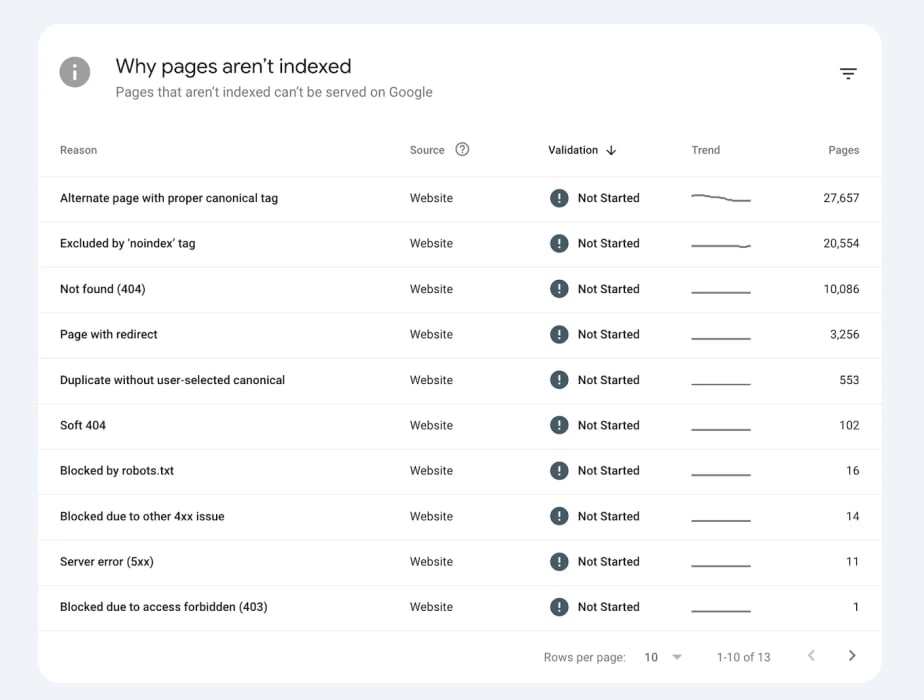
Image Credit: SE Ranking
- Use Bing Webmaster Tools: Free tool. Does not directly report pages like GSC but use a combination of Site Scan along with Site Explorer within BWT to find them.
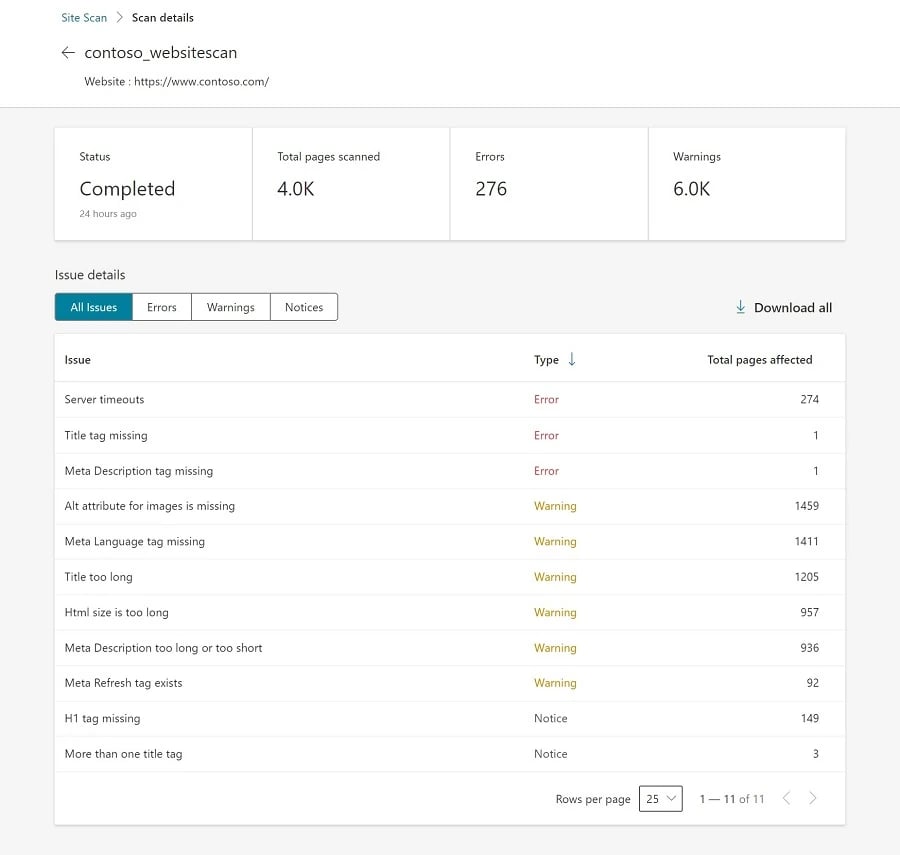
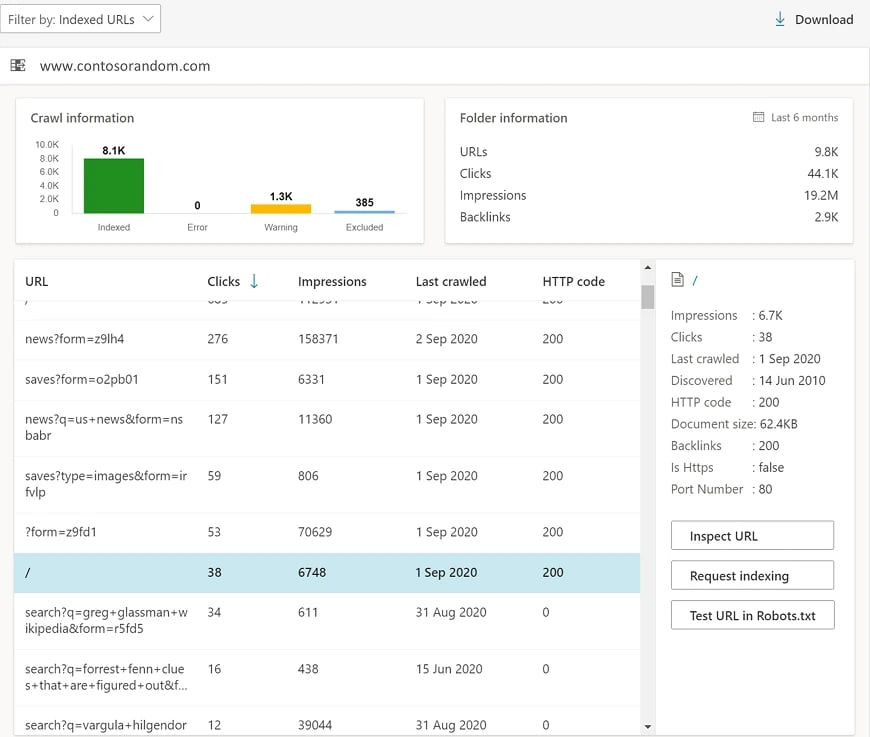
Image Credit: Microsoft
- Run Crawls with Screaming Frog: Freemium tool. Helps detect broken links, redirect chains, incorrect status codes and technical issues before Google finds them. I have been using Screaming Frog for over 10 years now.
- Analyse Traffic & Exit Pages in Analytics: Sudden drops, high exits or engagement declines often signal hidden errors affecting user experience or indexing.
- Monitor Server Logs for Error Spikes: Reveals repeated 500/503 errors, blocked bot requests, slow responses and crawling anomalies at the server level.
- Set Up Automated Alerts & Monitoring Tools: Uptime and real-time monitoring tools warn you instantly about downtime, spikes in errors or performance issues.
I have covered both GSC, BWT & Microsoft Clarity extensively in many of my past webinars.
[text_lm]
Step-by-Step Framework to Fix Page Errors
Once you’ve identified page errors across your site, the next critical step is systematic resolution. Here’s how to fix page errors:
Step 1: Crawl Your Site and Subdomains
Identify all 4xx and 5xx errors across important pages, internal links, and redirects.
Step 2: Categorise
Prioritise by critical pages (money pages, high traffic, backlinks), internal link errors, redirect chains, and server failures.
Step 3: Fix Root Causes
- Redirect using single-step 301s (keep an internal doc and remove all redirects after they have aged one year)
- Resolve server and permission issues with logs and hosting support
- Rebuild or redirect missing pages
- Use proper 503 codes with “Retry-After” for planned downtime
- If you must have 404, don’t leave money on the table, make it an exceptional experience for your users, see this.
Step 4: Revalidate in Google Search Console
Request indexing on fixed URLs to speed up re-crawling and re-indexing. Or use URL Inspection tool in both GSC and BWT.
Step 5: Monitor Regularly
Set weekly crawls and monthly audits to maintain uptime and fix new errors promptly.
[image_lm]
Final Thoughts
Page errors are unavoidable, but a well-maintained site will catch and fix them before they harm rankings.
Handled properly, HTTP errors can even help Google understand your site structure. Handled poorly, they can tank visibility, eat crawl budget, and break user trust.
The key is not perfection—it’s proactive monitoring, proper redirects, clean architecture, and stable hosting.
Warning: if you are a tech nerd like me, you can also setup a Cloudflare Worker to monitor your website and report back, every time users and bots see an error code you nominate (use wildcards over individual codes). If you are unsure how to do this, hit me on LinkedIn.
Frequently Asked Questions (FAQ)
Are all 404 errors harmful for SEO?
Some 404s are normal, but excessive or on important pages harm SEO. Fix critical 404s with redirects or recreate pages. If you must have them, make them exceptional. No web site is perfect and Google understands this, identify, fix, monitor.
How long does it take to recover SEO after fixing errors?
Recovery depends on crawl frequency. Requesting re-indexing speeds the process but expect weeks for full impact. From my personal experience, GSC Pages report takes forever to update. If you have applied the fix, now is the time to wait.
Can 503 errors during maintenance hurt rankings?
Temporary 503s with proper headers are fine, but extended downtime causes ranking drops.
How often should I audit for page errors?
Weekly crawls and monthly deep audits balance maintenance and resource use effectively.
Should eCommerce sites deploy stricter error controls than service sites?
Yes, eCommerce sites rely heavily on product pages, so they need stricter and more frequent monitoring and fixing.
Disclaimer
The contents of this blog are for informational and educational purposes only. They do not constitute professional SEO, GEO, AEO, ASO, or digital PR advice and should not be relied upon as such. We recommend consulting with an SEO expert before implementing any strategies. UR Digital accepts no responsibility or liability for any outcomes resulting from actions taken in reliance on the information contained in this content. Links to third-party websites are provided for reference purposes only. We do not endorse or guarantee the accuracy, relevance, or completeness of their content.