Microsoft Clarity’s AI Visibility feature launched in January 2026 tracks how AI bots crawl your site. By monitoring metrics like Bot Operator and Path Requests, you can identify which pages AI systems prioritise. Use this data to reduce crawl waste and optimise high-value content for better AEO/GEO citations. Bonus: You can now track your AI performance in Bing Webmaster Tools (currently in Beta, but available).
[text_lm]
Introduction
AEO and GEO live or die on one basic question: Are AI systems reaching your content? If you cannot see that traffic, you end up guessing which pages are accessible, where bots are getting stuck, and why your brand is not being referenced.
Microsoft Clarity introduced the AI Visibility Dashboard on 21 January 2026. This feature provides insights into how AI systems and automated agents interact with websites, which helps you understand the impact of automated traffic on infrastructure performance.
[image_lm]
What Does the Bot Activity Dashboard Measures?
The Bot Activity dashboard shows how automated systems access your site. It helps you see which AI systems and verified bots request your pages, how often they request them, and which URLs get the most automated attention.
Clarity is clear about the fact that bot activity means access, not usage. A bot requesting a page does not prove your content was retrieved for an answer, grounded in a response, cited, or surfaced to users.
Important AI Visibility Metrics and How to Read Them
Clarity’s Bot Activity view includes four core metrics.
Bot Operator
This shows which operators generate the most automated access. It helps you confirm which AI systems are showing up in your logs and how the volume compares across operators.
AI Request Share
This shows what portion of your total requests come from AI bots and agents. It is useful for two reasons:
- It tells you whether AI-driven access is negligible or a meaningful share of traffic.
- It helps with performance planning and cost planning when bot traffic is high.
Bot Activity
This groups automated requests by the primary role behind the access (examples include search, data services, developer tools, AI assistants). It helps explain why automated traffic exists, not just how much there is.
Path Requests
This highlights the pages and resources that receive the most automated requests, aggregated at the path level. It can include HTML pages, images, JSON endpoints, XML files, and other assets. Path requests tell you which URLs AI systems keep coming back for.
Why Are AI Visibility & Bot Activity Essential to AEO and GEO?
Bot Activity is an upstream signal. It shows the earliest measurable interaction between your content and AI systems, before any grounding, citation, or referral activity. That upstream view helps you answer these questions:
- Are AI systems reaching the pages that explain your services, proof, policies, and processes?
- Are they spending time on outdated pages, PDFs, filter URLs, or parameter junk?
- Which pages look like source material candidates because bots keep requesting them?
- Is bot volume high enough to create performance or cost issues?
How to Setup AI Visibility in Microsoft Clarity
[text_lm]
Clarity’s Bot Activity uses server-side logs collected through supported server/CDN integrations. These are the setup steps:
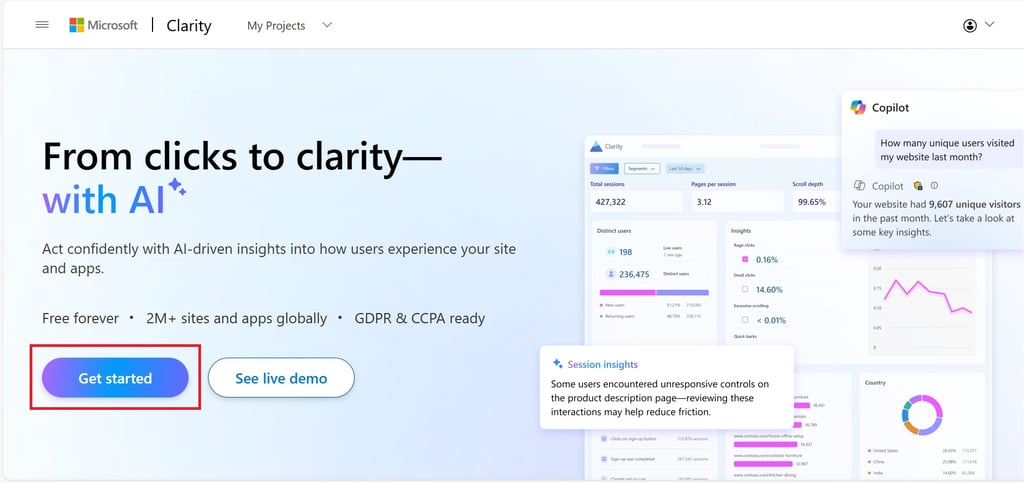
Step 1: Point your browser to Microsoft Clarity and click Get Started.
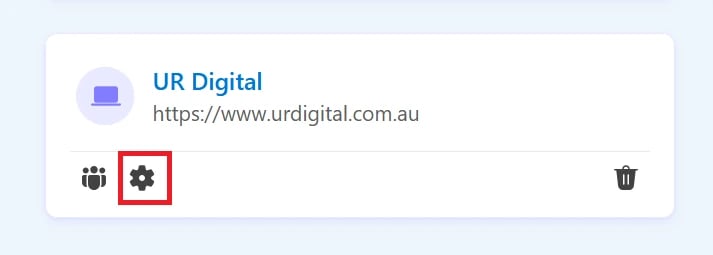
Step 2: Click the gear icon on any of your projects to open Settings.
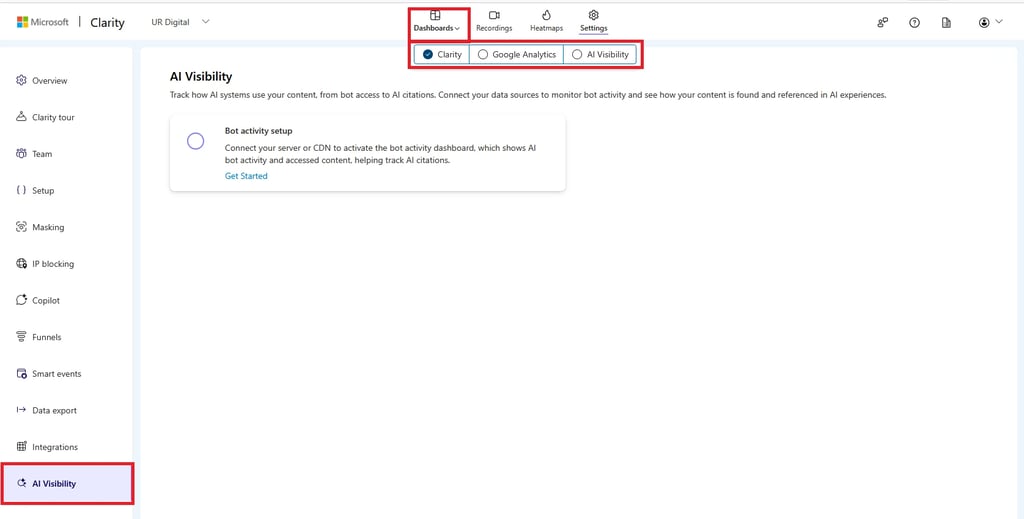
Step 3: Scroll all the way down in the left menu bar and click AI Visibility.
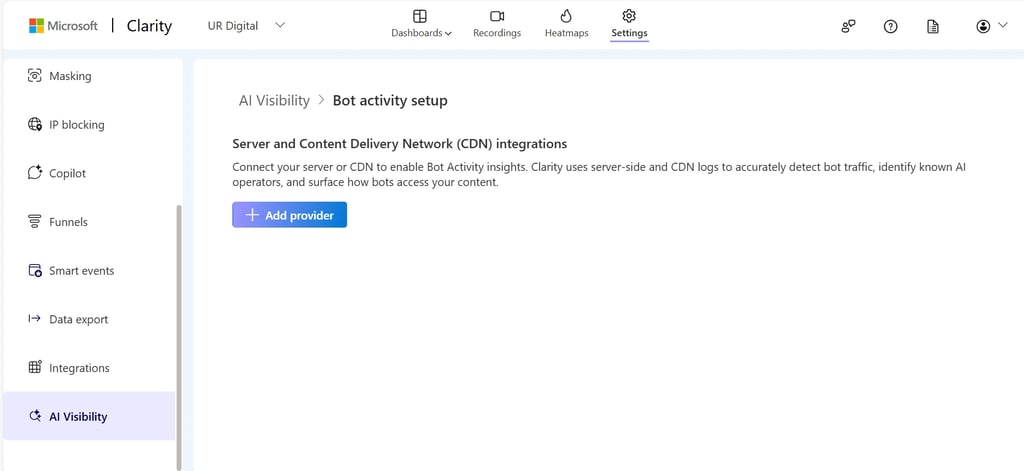
Step 4: Click Get Started under Bot activity setup. Click Add provider under Server and Content Delivery Network (CDN) integrations.
Step 6: Select your provider. At the time of publishing (4 February 2026), Microsoft Clarity’s AI Visibility feature supports Fastly, Amazon CloudFront, and Cloudflare Enterprise. Akamai and Azure Front Door support are coming soon).
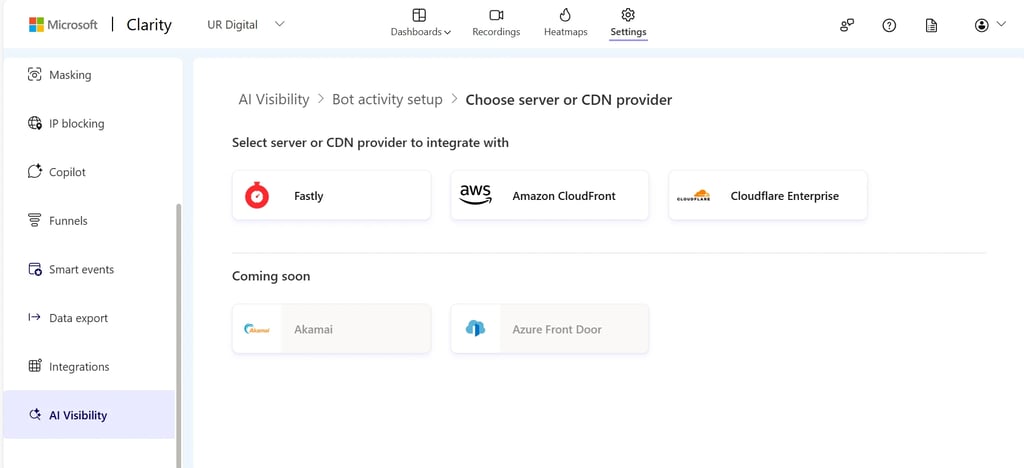
Step 7: If your provider is Cloudflare, follow the steps listed on the Clarity screen:
- Log in to your Cloudflare account.
- Create a new LogPush service for Clarity.
- Enter the HTTP destination details.
- Configure the LogPush job details.
- Click Submit to create the job. Once submitted, traffic should begin flowing to Clarity’s servers gradually.
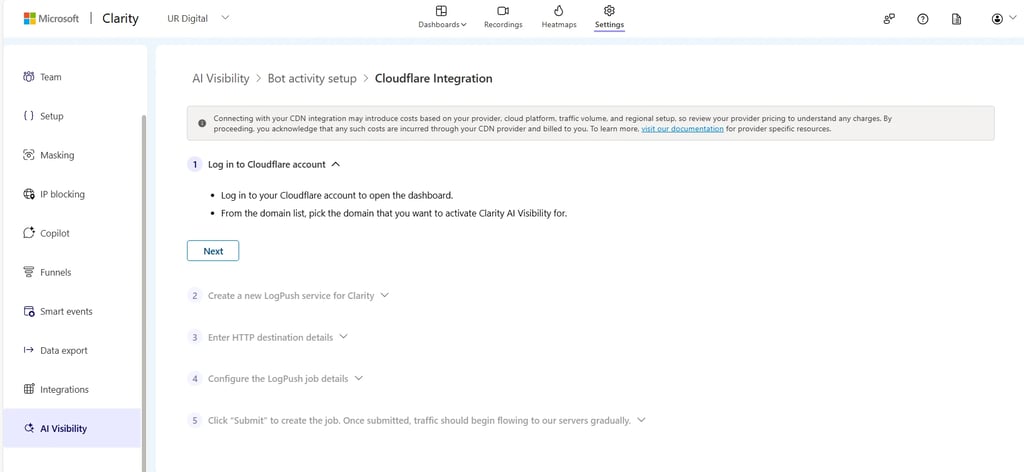
Once the connection is established, Clarity begins processing server-side logs and you can view the dashboard under Dashboards → AI Visibility → Bot Activity.
Note: For WordPress projects, Microsoft Learn states that this integration can be enabled by default when using the latest Clarity WordPress plugin.
[text_lm]
How to Use Bot Activity Data to Improve AI Visibility
Here’s how I would use bot activity data in an AEO/GEO program:
1) Check If Bots Can Reach Your Priority Pages
Look at Path requests. Your priority pages usually include:
- Service pages
- Pricing/packaging pages
- Comparison pages
- Case studies
- Guides
If those pages are missing, investigate blocking rules, login walls, or fragile rendering.
2) Find AI-priority URLs and Make Them Quotable
If bots repeatedly request a page, treat it like a high-value asset. Improve the page by implementing clear headings, short direct answers near the top, definitions, constraints, and proof so that it is easy to reuse accurately. This supports both AEO extractability and GEO trust.
3) Reduce Crawl Waste
If bots hammer parameter URLs, internal search pages, outdated PDFs, or thin pages, you are paying an attention tax. Fix your internal links, consolidate duplicate pages, tighten indexing rules, and keep one canonical source of truth for key info.
4) Use AI Request Share for Operational Planning
A high AI request share can create infrastructure load and cost. It is also a signal to take accessibility and performance seriously because bots cannot cite what they cannot reliably fetch.
5) Compare Upstream Bot Access Against Downstream Results
Bot Activity is access. Citations and leads are outcomes. Compare this data against your brand mentions, assisted conversions, and the pages that convert. Clarity positions Bot Activity as context to evaluate whether AI crawling contributes to visibility, attribution, or engagement.
Microsoft Clarity AI Visibility Performance and Cost Considerations
Clarity states visitors should notice no change in site speed or performance because the Clarity JavaScript is asynchronous.
It also warns that connecting server/CDN integrations may introduce costs depending on your provider, cloud platform, traffic volume, and regional setup. Those charges are billed by your provider, not Clarity.
Conclusion
If you care about AEO and GEO, you need visibility into the AI crawl layer. Clarity’s Bot Activity dashboard gives you that upstream view using server-side logs. It will not tell you that you rank in ChatGPT, but rather which AI systems access your content, which URLs they request most, and where your site is leaking opportunity.
Pulkit Agrawal from UR Digital can conduct an AI Visibility Audit for Australian enterprises with less than $10M in turnover to identify how crawlers interact with your site and which pages they prioritise for citations.
By mapping these insights to an AEO/GEO strategy, we can optimise your content to ensure your brand is accurately referenced by platforms like ChatGPT and Google Gemini.
Whether you require a full strategic roadmap or a technical checklist for your development team, our approach bridges the gap between traditional search and generative discovery to drive qualified leads and sustainable sales growth.
FAQs
Does Bot Activity mean my content is being used in AI answers?
No. Bot Activity shows automated access and crawling. It does not guarantee your content was retrieved for a response, grounded in an answer, cited, or surfaced to users. Treat it as an upstream signal, then validate outcomes with citation and performance data.
What does AI crawling mean in Clarity?
Clarity describes AI crawling as automated access by AI systems and supporting infrastructure to scan and request content. This can relate to search, discovery, and preparation for AI-generated responses. It reflects access to content, not confirmed use in answers.
Will Clarity slow down my website?
Microsoft says no. Visitors should notice no change in site speed or performance because the Clarity JavaScript loads asynchronously. If your team sees a measurable slowdown, treat it like any other script issue and test properly, but the default expectation is no perceptible impact.
Does connecting a server or CDN for Bot Activity cost money?
It can. Microsoft warns that connecting server/CDN integrations may introduce costs depending on your provider pricing, traffic volume, and regional configuration. Any log access, data transfer, or processing charges are incurred through your CDN or server provider and billed to you.
Can Clarity separate Google AI Overviews traffic from normal Google search?
Not reliably. Microsoft notes that traffic from AI-enhanced search features such as Google’s AI Overview cannot be cleanly separated from standard search because they share the same referrer. Clarity’s AI platform referrer focus is on direct AI chat platforms where referrers are distinct.
[image_lm]
Disclaimer
The contents of this blog are for informational and educational purposes only. They do not constitute professional SEO, GEO, AEO, ASO, or digital PR advice and should not be relied upon as such. We recommend consulting with an SEO expert before implementing any strategies. UR Digital accepts no responsibility or liability for any outcomes resulting from actions taken in reliance on the information contained in this content. Links to third-party websites are provided for reference purposes only. We do not endorse or guarantee the accuracy, relevance, or completeness of their content.